Mission feed · iPhone

NASA imagery and mission data, on your iPhone

The Astronomy Picture of the Day, raw photos from Curiosity and Perseverance, and Earth seen by NASA's EPIC camera, in one focused app with favorites, widgets and an optional daily notification.

Free No account Data not collected iOS 17+
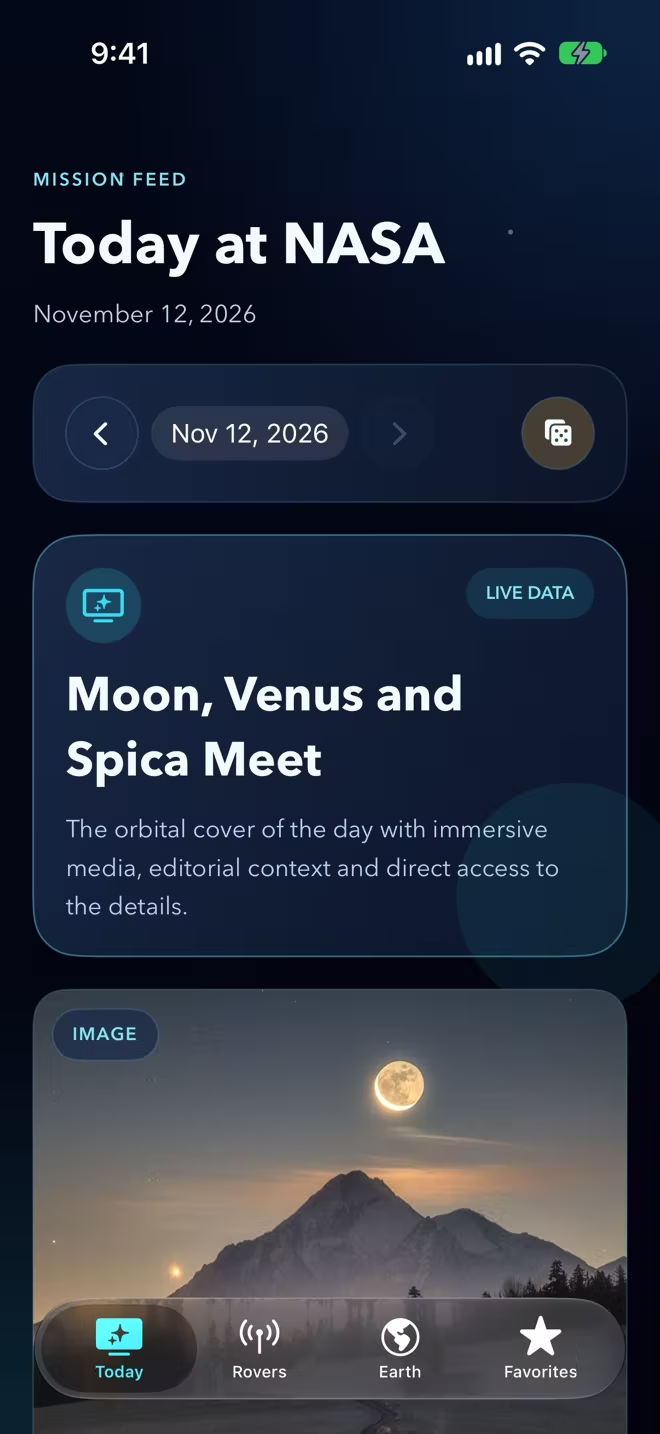
The Today tab of NASA Exp showing the Astronomy Picture of the Day

Four tabs

Explore the app

The same four tabs you find in the app: three public NASA sources and your own archive.

Today tab with the Astronomy Picture of the Day

APOD · science.nasa.gov

Today at NASA

The Astronomy Picture of the Day with its title and full explanation, as NASA publishes them, and the credit when NASA gives one.

  • Go back day by day, pick a date or jump to a random day since 1995
  • Full-screen view from the details screen
  • YouTube and Vimeo videos play in the details screen
Rovers tab with a grid of Perseverance Mastcam-Z photos from sol 2023

Mars · mars.nasa.gov

Mars Rovers

Raw images from Curiosity and Perseverance, straight from NASA's mission feeds, sol by sol.

  • Filter by sol and camera
  • Jump to the latest sol in one tap
  • Every photo with its camera, sol and Earth date
Earth tab with EPIC images of the whole planet for a date

EPIC · epic.gsfc.nasa.gov

Earth from EPIC

Full-disk images of Earth taken by NASA's EPIC camera.

  • Pick a date to see that day's images
  • Capture time and coordinates for each image
  • Save them to Photos with their title and credit
Favorites tab with a saved APOD and a saved rover photo

Personal archive

Favorites

Keep the images you like from any tab in a private archive on your iPhone.

  • Filter by APOD, Rovers or EPIC
  • Open each one with its full details
  • Stored only on your device
Home Screen with the medium NASA Exp widget showing the Astronomy Picture of the Day

Home Screen

Widgets and a daily notification

Bring NASA to your Home Screen, and get a heads-up when the new picture is out.

  • Astronomy Picture of the DayToday's APOD image, updated every day.
  • Latest from MarsThe newest raw photo from Perseverance or Curiosity, updated every few hours.
  • Earth from EPICThe latest full-disk image of Earth taken by EPIC.

Optional daily notification

Off by default. Turn it on in the app's About screen and choose the time; tapping it opens Today. All widgets come in small and medium sizes.

What's inside

Everything in the app

No sign-up, no ads and nothing to set up first.

  • APODMarsEarth

    Share

    The picture of the day is shared as an image with its title and credit; rover and EPIC photos share the image link.

  • APODMarsEarth

    Save to Photos

    Add images to your photo library with their title and credit.

  • APODMars

    Full screen

    Open the picture of the day or a rover photo full screen. Rover photos also zoom with a pinch or a double tap.

  • APOD

    Videos in the details screen

    When the picture of the day is a YouTube or Vimeo video, it plays in its details screen (YouTube in privacy-enhanced mode).

  • APOD

    Any day since 1995

    Step through the archive day by day, pick a date or land on a random day.

  • Mars

    Sol and camera

    Browse Curiosity and Perseverance by Martian sol and camera, or jump to the latest sol.

  • Earth

    Earth by date

    See EPIC's full-disk images for the date you pick, with capture time and coordinates.

  • APODMarsEarth

    Favorites

    Save what you like from any tab and filter your archive by type.

  • APODMarsEarth

    Home Screen widgets

    Three widgets, small and medium: today's APOD, the latest from Mars and Earth from EPIC.

  • APOD

    Daily notification

    Opt in to a daily notification at the time you choose, so you know the new picture is out.

  • Privacy

    No account

    Open the app and start exploring. There is nothing to sign up for.

  • Privacy

    No data collected

    No analytics, ads or tracking. Favorites and settings stay on your iPhone.

  • Privacy

    English and Spanish

    The whole interface is available in both languages.

Questions

FAQ

Is NASA Exp an official NASA app?

No. NASA Exp is not an official NASA app and is not affiliated with or endorsed by NASA. Images and data come from public NASA services (science.nasa.gov, mars.nasa.gov, api.nasa.gov) and keep their original credits.

How much does it cost?

Nothing. NASA Exp is free, with no ads and no in-app purchases.

What data does it collect?

None. There are no accounts, analytics, ads or tracking, and your favorites and settings stay on your iPhone. The details are in the privacy policy.

Where do the images come from?

The Astronomy Picture of the Day comes from science.nasa.gov, the rover photos from the raw-image feeds on mars.nasa.gov, and the Earth images from NASA's EPIC camera, through api.nasa.gov and epic.gsfc.nasa.gov. The picture of the day shows its credit when NASA gives one.

Do I need an account?

No. Open the app and start exploring.

Which languages does it support?

English and Spanish. Titles and explanations come from NASA and are shown as NASA publishes them, in English.

Does it work on iPad?

NASA Exp is designed for iPhone. There is no iPad version.

Which iOS version do I need?

iOS 17.0 or later.

NASA Exp 1.0

Take NASA with you

Free on iPhone with iOS 17 or later.